In this example we will discuss about VPN/IPsec with BGP between Cisco Adaptive Security Appliance(ASA) and IOS Router.
First we are going to configure Cisco ASA , then we will configure remote router.
Configuration on Cisco ASA:
Below topology showing the connectivity between ASA Firewall and Cisco IOS Router over internet.
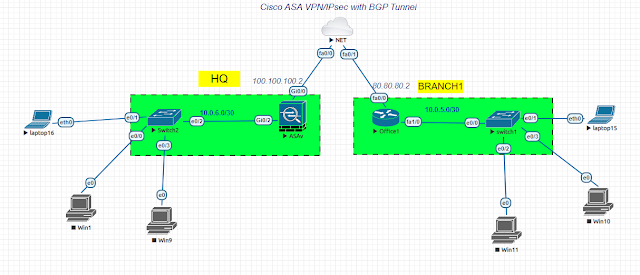
Step-1: Configure the inside and outside interfaces on Cisco ASA
interface GigabitEthernet0/0
nameif outside
security-level 0
ip address 100.100.100.2 255.255.255.0
interface GigabitEthernet0/2
nameif inside
security-level 100
ip address 10.0.6.1 255.255.255.0
Step-2: Phase 1 Configuration(isakmp)
crypto ikev1 policy 100
authentication pre-share
encryption 3des
hash md5
group 5
lifetime 86400
crypto ikev1 enable outside
tunnel-group 80.80.80.2 type ipsec-l2l
tunnel-group 80.80.80.2 ipsec-attributes
ikev1 pre-shared-key *****
Step-3: Phase 2 Configuration
crypto ipsec ikev1 transform-set TEST esp-3des esp-md5-hmac
crypto map asamap 10 match address 110
crypto map asamap 10 set peer 80.80.80.2
crypto map asamap 10 set ikev1 transform-set TEST
crypto map asamap interface outside
Step-4: BGP configuration on ASA Firewall
router bgp 200
bgp log-neighbor-changes
address-family ipv4 unicast
neighbor 80.80.80.2 remote-as 100
neighbor 80.80.80.2 ebgp-multihop 255
neighbor 80.80.80.2 activate
network 10.0.6.0 mask 255.255.255.0
no auto-summary
no synchronization
exit-address-family
!
route outside 80.80.80.0 255.255.255.0 100.100.100.1
Configuration on Cisco Router as Remote Router:
Step-1: Phase 1 Configurations
crypto isakmp policy 20
encr 3des
hash md5
authentication pre-share
group 5
crypto isakmp key 6 cisco123 address 100.100.100.2 255.255.255.0
Step-2: Phase 2 Configurations
crypto ipsec transform-set TEST esp-3des esp-md5-hmac
!
crypto map iosmap 10 ipsec-isakmp
set peer 100.100.100.2
set transform-set TEST
match address 110
!
access-list 110 permit ip 10.0.5.0 0.0.0.255 10.0.6.0 0.0.0.255
!
interface FastEthernet0/0
ip address 80.80.80.2 255.255.255.0
duplex half
crypto map iosmap
Step-3: BGP configuration
router bgp 100
bgp log-neighbor-changes
neighbor 100.100.100.2 remote-as 200
neighbor 100.100.100.2 ebgp-multihop 255
!
address-family ipv4
no synchronization
network 10.0.5.0 mask 255.255.255.0
neighbor 100.100.100.2 activate
no auto-summary
exit-address-family
Verify:
BRANCH#sh crypto isakmp sa
IPv4 Crypto ISAKMP SA
dst src state conn-id slot status
100.100.100.2 80.80.80.2 MM_NO_STATE 0 ACTIVE
ciscoasa# sh crypto ikev1 sa
IKEv1 SAs:
Active SA: 1
Rekey SA: 0 (A tunnel will report 1 Active and 1 Rekey SA during rekey)
Total IKE SA: 1
1 IKE Peer: 80.80.80.2
Type : L2L Role : responder
Rekey : no State : MM_ACTIVE
BRANCH#sh ip bgp summary
Neighbor V AS MsgRcvd MsgSent TblVer InQ OutQ Up/Down State/PfxRcd
100.100.100.2 4 200 5 4 3 0 0 00:00:47 1
ciscoasa# sh bgp summary
Neighbor V AS MsgRcvd MsgSent TblVer InQ OutQ Up/Down State/PfxRcd
80.80.80.2 4 100 4 5 2 0 0 00:00:01 1
First we are going to configure Cisco ASA , then we will configure remote router.
Configuration on Cisco ASA:
Below topology showing the connectivity between ASA Firewall and Cisco IOS Router over internet.

Step-1: Configure the inside and outside interfaces on Cisco ASA
interface GigabitEthernet0/0
nameif outside
security-level 0
ip address 100.100.100.2 255.255.255.0
interface GigabitEthernet0/2
nameif inside
security-level 100
ip address 10.0.6.1 255.255.255.0
Step-2: Phase 1 Configuration(isakmp)
crypto ikev1 policy 100
authentication pre-share
encryption 3des
hash md5
group 5
lifetime 86400
crypto ikev1 enable outside
tunnel-group 80.80.80.2 type ipsec-l2l
tunnel-group 80.80.80.2 ipsec-attributes
ikev1 pre-shared-key *****
Step-3: Phase 2 Configuration
crypto ipsec ikev1 transform-set TEST esp-3des esp-md5-hmac
crypto map asamap 10 match address 110
crypto map asamap 10 set peer 80.80.80.2
crypto map asamap 10 set ikev1 transform-set TEST
crypto map asamap interface outside
Step-4: BGP configuration on ASA Firewall
router bgp 200
bgp log-neighbor-changes
address-family ipv4 unicast
neighbor 80.80.80.2 remote-as 100
neighbor 80.80.80.2 ebgp-multihop 255
neighbor 80.80.80.2 activate
network 10.0.6.0 mask 255.255.255.0
no auto-summary
no synchronization
exit-address-family
!
route outside 80.80.80.0 255.255.255.0 100.100.100.1
Configuration on Cisco Router as Remote Router:
Step-1: Phase 1 Configurations
crypto isakmp policy 20
encr 3des
hash md5
authentication pre-share
group 5
crypto isakmp key 6 cisco123 address 100.100.100.2 255.255.255.0
Step-2: Phase 2 Configurations
crypto ipsec transform-set TEST esp-3des esp-md5-hmac
!
crypto map iosmap 10 ipsec-isakmp
set peer 100.100.100.2
set transform-set TEST
match address 110
!
access-list 110 permit ip 10.0.5.0 0.0.0.255 10.0.6.0 0.0.0.255
!
interface FastEthernet0/0
ip address 80.80.80.2 255.255.255.0
duplex half
crypto map iosmap
Step-3: BGP configuration
router bgp 100
bgp log-neighbor-changes
neighbor 100.100.100.2 remote-as 200
neighbor 100.100.100.2 ebgp-multihop 255
!
address-family ipv4
no synchronization
network 10.0.5.0 mask 255.255.255.0
neighbor 100.100.100.2 activate
no auto-summary
exit-address-family
Verify:
BRANCH#sh crypto isakmp sa
IPv4 Crypto ISAKMP SA
dst src state conn-id slot status
100.100.100.2 80.80.80.2 MM_NO_STATE 0 ACTIVE
ciscoasa# sh crypto ikev1 sa
IKEv1 SAs:
Active SA: 1
Rekey SA: 0 (A tunnel will report 1 Active and 1 Rekey SA during rekey)
Total IKE SA: 1
1 IKE Peer: 80.80.80.2
Type : L2L Role : responder
Rekey : no State : MM_ACTIVE
BRANCH#sh ip bgp summary
Neighbor V AS MsgRcvd MsgSent TblVer InQ OutQ Up/Down State/PfxRcd
100.100.100.2 4 200 5 4 3 0 0 00:00:47 1
ciscoasa# sh bgp summary
Neighbor V AS MsgRcvd MsgSent TblVer InQ OutQ Up/Down State/PfxRcd
80.80.80.2 4 100 4 5 2 0 0 00:00:01 1




4 Comments
Happily recommending this 300-615 study guide from Crack4sure to all students.
ReplyDeletesuccess finally in 300-615 Dumps
ReplyDelete300-415 Dumps is a gem among exam preparation resources. The attention to detail and the clarity of explanations truly set it apart. I appreciated the emphasis on key concepts, which helped me prioritize my study time effectively. The study guide not only covered the theoretical aspects comprehensively but also provided practical insights that are invaluable for real-world applications. Dumpspass4sure's dedication to providing high-quality study materials is evident, and I am extremely satisfied with their service. If you're serious about passing the300-415 Exam Dumpspass4sure is the way to go."
ReplyDelete
ReplyDeleteتُعد شركة تصميم مواقع في مكة خيارًا مناسبًا للشركات وأصحاب المشاريع الذين يرغبون في بناء حضور رقمي احترافي والوصول إلى العملاء المستهدفين بشكل أكثر فاعلية. ويعتمد نجاح الموقع الإلكتروني على الجمع بين التصميم الجذاب وسهولة الاستخدام والسرعة والتوافق مع الهواتف الذكية، إلى جانب الاهتمام بأساسيات تحسين محركات البحث. كما يساعد الموقع المصمم بطريقة احترافية على عرض الخدمات والمنتجات بصورة منظمة، وتعزيز ثقة العملاء، وتوفير وسيلة فعالة للتواصل مع الجمهور، مما يجعله أداة مهمة لدعم نمو الأعمال والمنافسة في السوق المحلي.